Interesting Places

Interesting places near you, found by travelers, not algorithms

Sorom's Interesting Places is a community atlas of hidden gems. Browse community-submitted places reviewed before publication. Explore on desktop or tablet, and use the mobile app to submit your own discoveries.

What counts as an interesting place

Search for interesting places near you and most results look the same: the top ten list, the ticketed attraction, the square everyone photographs. Those places are fine. They are also the ones you would have found without any help.

Interesting Places collects community suggestions that may be worth adding to your route: a mural, a viewpoint, a small gallery or another local discovery. Check that a place is open to visitors and respect residents, property rights and local rules.

A useful submission explains why the place matters, what a visitor can expect and how to visit responsibly. Popular places can be interesting too; practical, accurate information matters more than exclusivity.

Travelers, not rankings

Community members submit places for review before publication. That process helps with quality, but it is not a guarantee that every detail, opening hour or access condition is current. Check important information before visiting.
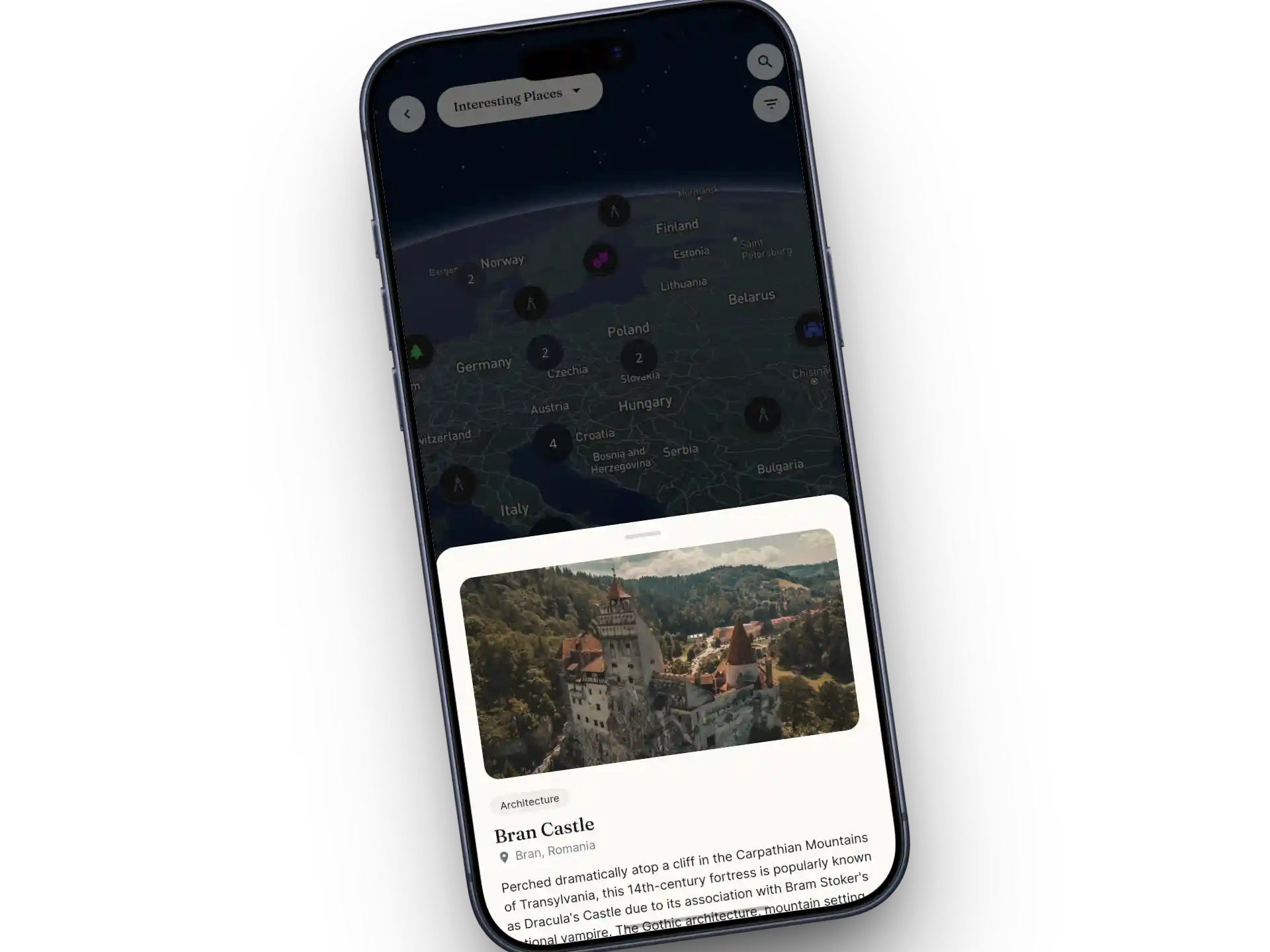

The Map

The 13 categories of hidden gems

Pick a category when you know the mood, or browse everything nearby when you do not. Together they cover most of what "off the beaten path" means to different travelers.

Hidden Gem

Places barely anyone outside the neighborhood knows about.

Historical

Sites with a real story to tell, not just a plaque.

Nature

Parks, trails, waterfalls, and quiet green corners.

Art

Street art, small galleries, and creative spaces.

Architecture

Buildings worth crossing town to see.

Food

Where locals actually eat and drink.

Viewpoint

The panoramas that make a city make sense.

Unusual

The delightfully odd finds you tell stories about later.

Cultural

Traditions, festivals, and community spaces.

Religious

Temples, churches, shrines, and sacred sites.

Abandoned

Ruins and historic sites where public access is permitted; do not enter restricted or unsafe structures.

Underground

Publicly accessible tunnels, crypts and underground attractions; follow site rules and guided-access requirements.

Local Gem

Neighborhood favorites locals return to again and again.

Quality Control

How a place gets on the map

Interesting Places is community-built, but it is not a free-for-all. Every pin passes through the same four steps.

A traveler submits it

In the app, a traveler adds a title, a description, a category, a pin on the map, and photos. Practical tips go in too: the best time to go, how to find the entrance, what to order.

A Sorom agent reviews it

Before anything goes live, a Sorom agent checks the submission for accuracy and quality. Submissions that miss the bar come back with feedback, so the traveler can fix the details and resubmit.

The approved place goes live

Approved places become available to the community. Any eligible Sorom Points or rewards follow the current mobile-app terms; approval does not guarantee a particular reward or membership.

Edit suggestions keep it current

Community members can suggest corrections in the mobile app for review. Opening hours, entrances and access rules can still change, so confirm the details you need before visiting.

Finding interesting places near you

Use the available map, filters and place list to explore an area. Location permissions are optional; you can navigate the map manually. Features and sorting options can differ between the web and mobile app.

Open a place to review available photos and community information. Contributions may be dated or incomplete, and a photo does not guarantee the site’s current appearance or access.

Where translations are available, you can read place descriptions in a supported language. Machine-generated wording may be inaccurate; check names and important instructions against the original or a local source.

Planning from a laptop? Sign in to the Sorom web app with your email and password to browse the map and read place details. Continue with the same account on your phone when you land.

Sorom app screen showing the Interesting Places map, with hidden gems near you pinned by fellow travelers

From a saved place to a plan

The mobile app offers ways to keep and discuss places. The web app supports the browsing and saved-place features available to your account.

  • Bookmark it. Save places for a future trip and find them again in one list.
  • Mark "been here". Keep a record of the places you have visited, and let the next traveler see that people actually go.
  • Add a place to a suitable itinerary item, reviewing the date, location and practical details. Maya can help with mobile AI planning under current allowances; web planning is manual.
  • Use mobile comments to ask a question or share a relevant tip. For time-sensitive access information, check with the place directly.

That path matters most on longer routes. If you are working out how to plan a multi-city trip, a bookmarked list of places in each city is the fastest way to give every stop a reason. And after the trip, the places you marked as visited sit alongside your travel journal as a record of where you actually went.

Explore it together

In the mobile app, ConneXions can help you discuss a place with potential companions and plan together. Profile compatibility is a conversation aid, not a guarantee of a good or safe meetup.

Submit your own hidden gem

Every traveler has a place they wish someone had told them about. Submitting it takes a few minutes in the app, and the strongest submissions share a few habits.

  • A clear title and an honest description. Say what the place is, why it is worth a detour, and what to expect on arrival.
  • The right category. A quiet viewpoint is still a viewpoint, not a hidden gem. Picking the closest fit helps other travelers filter well.
  • An accurate pin. Drop it at the entrance, not the middle of the block.
  • Photos you took. Community photos carry your attribution, and real photos help the reviewing agent confirm the place is what you say it is.
  • Practical tips. The best hour to go, whether cash is needed, how to find the door.

Submit places and upload your own permitted photos in the mobile app. Check the current contribution requirements and reward terms before submitting.

Why we built it

Community discoveries offer another perspective alongside official information, guidebooks and reviews. We built Interesting Places to help travelers share useful context about places they find.

FAQ

Interesting places near you: common questions

What is the best way to find interesting places near me?

Browse the Sorom place map and available filters on desktop or tablet, or use the mobile app. Community submissions are reviewed before publication, but you should still confirm current opening hours, access and local conditions.

Is Interesting Places free?

Sorom is free to download, and the web app provides place browsing. Check the current app for the requirements of saving, marking visits, comments, contributions and rewards. Submission and photo uploads continue in the mobile app.

Who reviews the places on the map?

Sorom reviews submissions before publication and reviews community edit suggestions. Moderation supports quality; it does not guarantee every detail remains accurate or that a place is safe or open to visitors.

Can I browse hidden gems on my laptop, or only in the app?

Both. The Sorom web app lets you sign in with your email and password to browse the map and read place details on desktop or tablet. Submitting a new place with photos is done in the iOS or Android app.

Are place descriptions available in my language?

Descriptions may be available in supported languages. Some translations are machine-generated and can contain errors, so check important names, directions and restrictions against the original or an authoritative local source.

Your next detour is already on the map

Explore the places map on desktop or tablet, then build a manual solo itinerary for your favorites.

Submit your own places and add photos in the app.